
Emails have become indispensable in both our professional and private lives. But precisely because of their popularity, they are a favorite entry point for phishing, malware and data theft. Here you’ll learn how to protect yourself—and TU Braunschweig—from digital traps. Always keep in mind that an email is essentially like a postcard and could be read at various points. Therefore, use the appropriate security certificates. As a member of TU Braunschweig, you can apply for an email certificate.
If you ever feel uncertain despite following these tips, verify the contents of any suspicious email via another communication channel. In short: just pick up the phone and call!
Phishing is a method by which Internet users are deceived via fraudulent email messages or websites in order to disclose personal or confidential information, such as passwords (password fishing).
Other types of phishing:
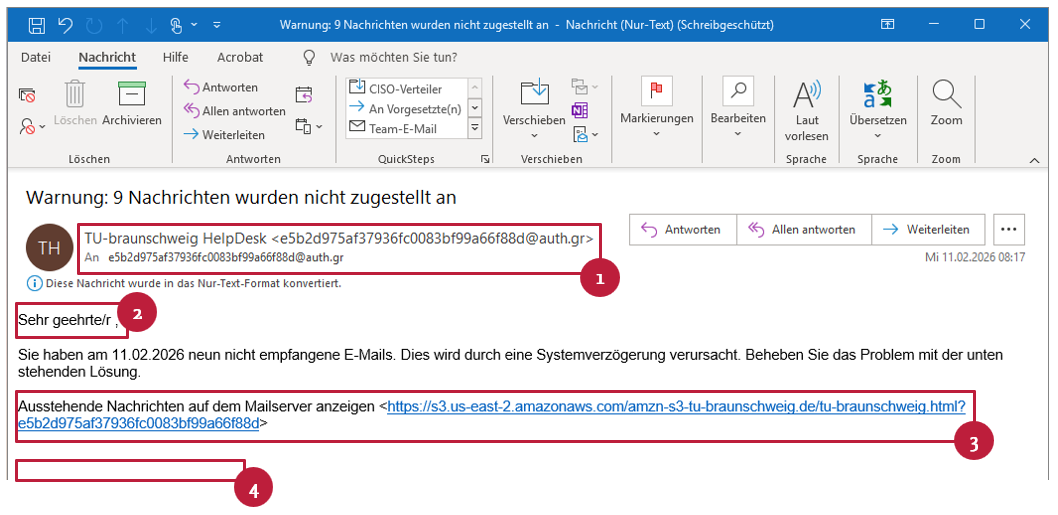
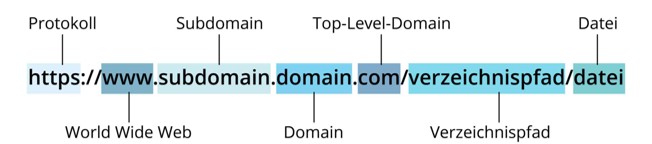
Always make sure that the domain in any email link is spelled exactly and without errors (e.g. tu-braunschweig.de, not braunschwieg.de). Hover your mouse over the link (or long-press on a smartphone) to verify that the visible URL matches its actual destination, and check that sender addresses such as “servicedesk@rz.tu-bs.de” really belong to your institution. Read the URL from right to left to clearly identify the top-level domain (.de, .com, etc.), the main domain (e.g. tu-braunschweig) and any subdomains (e.g. informationsportal). Spoofing attempts often add extra levels—for example, in “tu-braunschweig.de.service-desk.de”, “service-desk” is the main domain and “tu-braunschweig” is only a subdomain.
Examples of genuine domains:
Examples of fake domains:
Send as an attachment to phishing@tu-braunschweig.de.
Change your password:
https://www.tu-braunschweig.de/it/passwort-aendern
Get in touch with us!